How to Display What's Playing on Your Turntable
There is a specific friction that every vinyl listener knows. The record is spinning, the music is playing, and you are settled into the couch or the reading chair or the spot on the floor you always end up in. Then a song comes on that you have not heard in a long time, and you want to know what it is. So you have to get up. You have to cross the room. You have to pick up the sleeve and squint at the small print. And by the time you figure it out, the moment has passed.
This is not a problem with vinyl. Vinyl is great. This is a problem with information asymmetry. The music exists in the room, but the data about the music lives somewhere else entirely.
The fix is simple: put a display near your turntable that shows you what is playing.
Why a Dedicated Display Is Worth It
Before we get into the options, let us address the obvious question. Is this vanity? Are you just adding a screen to your setup because screens are cool?
No. This is pure utility. A display near your turntable solves a real problem that happens every single time you listen to a record you do not immediately recognize. It eliminates the friction of having to interrupt your listening session to go identify what you are hearing. That is not decoration. That is a quality-of-life improvement for your entire listening habit.
Option 1: A Mounted Tablet or Display Near the Turntable
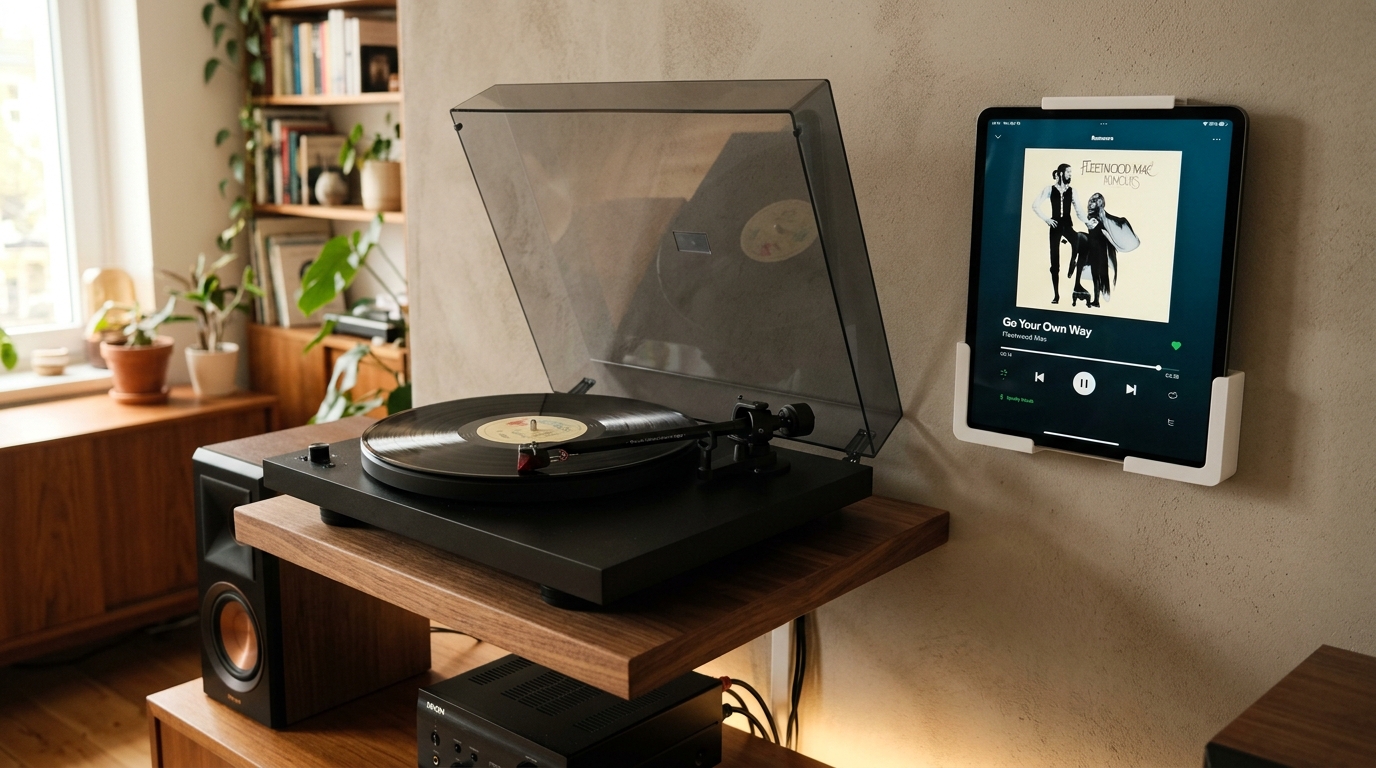
The most common approach is to mount a tablet or a small monitor near your turntable. A 7 to 10 inch Android tablet or an iPad Mini works well here. You mount it on the wall, on the side of your shelf, or on a small stand that sits next to the turntable. It is always on, always visible, and always showing you what is playing.
The advantage of a tablet is that it is affordable, widely available, and easy to set up. You can use a VESA mount, a 3M Command strip, or a dedicated tablet stand. The disadvantage is that tablets have screens that emit light, which might not fit the vibe of a cozy analog listening space. But if you are running What's Spinning on it, the display will show album art and track info in a way that looks intentional and clean.
Option 2: Use an Existing TV in the Room
If your listening room already has a television, you can use that. Depending on your setup, you might cast the Now Playing display to the TV, run an HDMI cable from a small computing device to the TV, or use a casting protocol that pulls the What's Spinning data onto the screen.
This approach works well for larger rooms or for people who have their turntable in a living room that already has a TV as the visual center of gravity. The trade-off is that the TV might be across the room, which means you still have to look away from your listening position to see it. But for gatherings or parties, a TV display is excellent because it lets everyone in the room see what is on without anyone needing to get up.
Option 3: A Dedicated E-Ink Display for a Clean Look
If you care about aesthetics and you want something that fits more naturally into a vinyl-focused environment, consider a dedicated e-ink display. These are the screens you see in digital art frames and electronic shelf labels. They have no backlight, they look like paper, and they blend into a room in a way that a glowing tablet simply does not.
E-ink displays for this use case are still an emerging category, but they are growing. A small e-ink panel mounted next to your turntable can show artist, track, and album art in high contrast without any of the light pollution that comes with a traditional screen. If your listening space is dark, moody, or designed around the aesthetic of analog hardware, this is the option that will not fight your vibe.
Connecting It All with What's Spinning
Whatever hardware you choose, What's Spinning is the software layer that ties it together. The app runs on a central device, detects what is playing based on audio fingerprinting or metadata from your turntable setup, and pushes that information to your chosen display in real time.
The setup on the software side is straightforward. You configure your display endpoint, connect it to the same network as your What's Spinning instance, and the Now Playing data flows automatically. You do not have to tell it what record you are playing. It figures it out and updates the display the moment the needle drops.
Placement Tips
A few things to keep in mind when you are figuring out where to put your display:
- Eye level matters. The display should be at or near eye level when you are in your normal listening position. If you are usually seated, mount it lower. If you stand while you listen, mount it higher.
- Viewing angle counts. Make sure you can see the display from wherever you spend the most time in the room. Test it before you commit to a mounting location.
- Cable management is not optional. Whatever device you are using, plan for how the power cable and any data cables will be routed. Nothing kills a clean setup faster than a tangle of cables dangling from a wall-mounted tablet.
Using It for Parties and Gatherings
One thing that surprises people is how much a Now Playing display adds to social listening. At a party or a gathering, guests are always curious about what is playing. They hear something they like, they want to know what it is, and they ask. With a display, they can just look. No one has to interrupt the host. No one has to get up and check the sleeve.
It also makes your setup feel more intentional. Showing guests that you have a system in place, that your turntable is connected to something that tracks and displays your listening in real time, is a small detail that says a lot about how you approach music.
The best listening session is one where you never have to get up.
A spreadsheet tracks what you own. What's Spinning identifies what's playing.
On-device vinyl ID logs your listening history automatically. 7-day free trial.
Looking for Shazam for vinyl?
What's Spinning identifies what's playing on your turntable on-device, logs history, and AirPlays now-playing to your TV.
Comparing vinyl ID apps?
Analog requires Discogs and is iPhone-first (iPad coming). What's Spinning works without Discogs on iPhone and iPad with AirPlay.
Try What's Spinning Free
Turn your iPad into a live now-playing display. Track every record you spin.
START FREE TRIALThen $4.99/mo or $39.99/yr · Cancel anytime